
The job management app built for tradies
Run every job
from your phone.
From the first call to getting paid, every job lives in one app. Quote before you leave the site, invoice the minute the job's done, and start every day knowing exactly what's on.
iPhone and Android · Use it on every job, wherever the work comes from
If the customer accepts, move the job to Hired
I've been hiredBuilt around how you work
One app for the whole job.
The old way
Everything in six places
- Prices made up on the spot, from memory
- Quotes written at the kitchen table at 9pm
- Jobs spread across a notebook, texts and a spreadsheet
- Working out who's paid from your bank statement
The Toolbox way
Everything in one place
- Your saved prices on every quote, so you're consistent and protect your margin
- Quotes sent before you leave the site, while you're still top of mind
- Every job in one list on your phone, so nothing gets missed
- Who's paid, part-paid and overdue at a glance, so you always know where your money is
How it helps
From first call to paid, all in one app.
Quote on site in minutes, just by talking.
Talk the job through as you walk the site and Toolbox builds the quote from your own prices. It's ready to send before you're back in the ute.
See how it worksSee every job in one place.
Open the app and know what's on today, what's quoted and what needs you next, so you spend your time on the work.
Get paid before you pack up.
Customers pay by card straight from your invoice, so the money's on its way before you leave.
Get paidLook as professional as your work.
Your logo and ABN on every quote and invoice. Customers accept with a tap, and it becomes the invoice with one more.
Quotes & invoices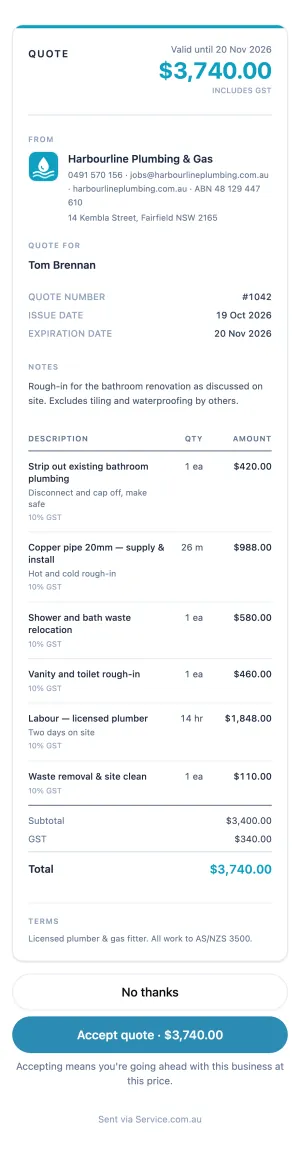
Your day, at a glance
Know exactly what's on today.
Open Toolbox in the morning and your whole day's laid out, so you can get straight to work.
- TodayEvery visit booked in for today with its arrival time, so you can plan your run.
- Needs actionThe jobs waiting on you and the next step for each, so nothing falls through the cracks.
- WaitingQuotes you've sent and are waiting on, so you know exactly who to follow up.
- Where it came fromWord of mouth, a repeat customer or a Service.com.au lead, so you know how every job found you.
Always know the next step
Every job moves forward with one tap.
Every job shows what it needs next and takes you straight there, so your jobs keep moving.
Around the job
Everything about the job, in your pocket.
The gate code, the photos, the last call. It's all there when you pull up.
- PhotosBefore, during and after shots saved to the job, so you've got a record of your work.
- Private notesThe gate code and the dog's name, saved for every visit.
- Call outcomesLog every call so you know who to chase and when.
If the customer accepts, move the job to Hired
I've been hired- Visit typesAn inspection, the job itself or a follow-up, so every visit is clear in your day.
- Arrival windowsGive customers an exact time or a window of up to 2 hours, so they know when to expect you.
- Customers saved onceSave a customer once and they're filled in on every job, quote and invoice.
Ready to grow?
More work, whenever you want it.
Turn on a Service.com.au lead plan whenever you want more work. Local jobs land straight in Toolbox, ready to quote.
On lead jobs, customers confirm visit times and get status updates automatically, so you spend less time on the phone.
Who it's for
Built for tradies who run their own business.
Sole traders and small outfits
Made for the person who quotes, invoices and gets paid. One login for the business.
On your phone
iPhone or Android, in your browser or the Service.com.au app, so your business goes wherever you go.
Every job in one place
Word of mouth, repeat customers, your own website or Service.com.au leads, all run the same way.
Pricing
One simple price for your whole business.
- Your first month free
- One subscription covers every listing you have
- Quoting and invoicing included on jobs from Service.com.au leads
- Cancel any time from Billing, and your jobs and documents stay yours
Card taken at sign-up. You won't be charged until your free month ends.
FAQ
Before you start
- What is Toolbox?
- The job management app from Service.com.au, built to help Australian tradies run their business from their phone. Quote by talking or typing, send quotes and invoices with your logo and ABN, and get paid by card. It works on every job, not just ones from Service.com.au.
- How much is it?
- $29 a month + GST for the business, with the first month free. Quoting and invoicing are included on jobs from Service.com.au leads.
- Do I need a Service.com.au listing?
- You get one free when you sign up, and you can add Service.com.au leads whenever you want more work.
- What does a card payment cost me?
- Just the standard card processing fee.
- How do my customers see a quote?
- They get a link by text or email and open it on their phone. There's nothing to sign up for, so it's easy for them to say yes.
- Does it work on my phone?
- Yes, on iPhone and Android, in your phone's browser or in the Service.com.au app.