
The quote and invoice app for tradies
Quote on site in minutes,
just by talking.
Talk the work through as you walk the site and Toolbox builds the quote from your own prices. It's ready to send before you're back in the ute.
“Quote for Sarah Kim on Elm Street. Replace the hot-water system, remove the old unit, and allow $250 for disposal.”
Quote on site, win the job
Be the first quote they get.
The old way
- On site. Scribble some notes and say you'll send a price.
- 9:00pm. Write the quote at the kitchen table.
- Next day. They've already rung someone else.
The Toolbox way
- On site. Talk through the job as you look around.
- Before you leave. The quote's on their phone, with your logo on it.
- Next day. Yours is the quote they're already looking at.
How it works
From talking to sent in three steps.
Tap the mic and talk
Say the customer, the work and any price you know. It's faster than typing, though typing works too.
Tap “Build my quote”
Each line of work is pulled out and priced from your price book, so the maths is done for you.
Check it, send it
Change anything, then Review & send. They get it while you're still in the driveway, and accept with a tap.
Your price book
Price every job with confidence.
Save your prices once and every quote uses them. The same job gets the same price every time, so you stay consistent and protect your margin.
Your price book builds as you quote. Just tick “Save this item to my price book” on any line.
Update saved price
Protect your margin
Every line priced, every time.
Every line is priced from your book or from what you said. Anything without a price waits for you, so every quote goes out right.
Update saved price
Under your name
Quotes they can say yes to from their phone.
Look as professional as your work. Your logo and ABN up top, every line and the GST worked out, and a button to accept.
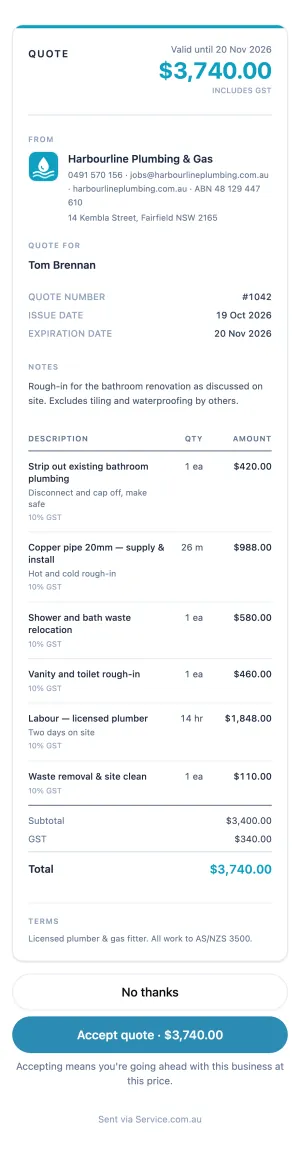
- Your logo and details
Pulled from your listing if you have one, so there's less to set up.
- Your ABN on every quote and invoice, so you look like the business you are
With your phone, email and address, so customers can always reach you.
- Who it's for
The customer's name, filled in for you.
- Lines, units, GST
Quantities and GST per line, added up for you.
- Valid until
Set when you send it, so the customer knows how long your price stands.
- Your terms
Write them once and they go on every quote.
Change of plan?
Update the quote without starting again.
Tap Revise quote, make the change and publish it. Their link updates and they get a text or email, so you're both looking at the same quote.
Quote to invoice
Invoice in one tap, right on site.
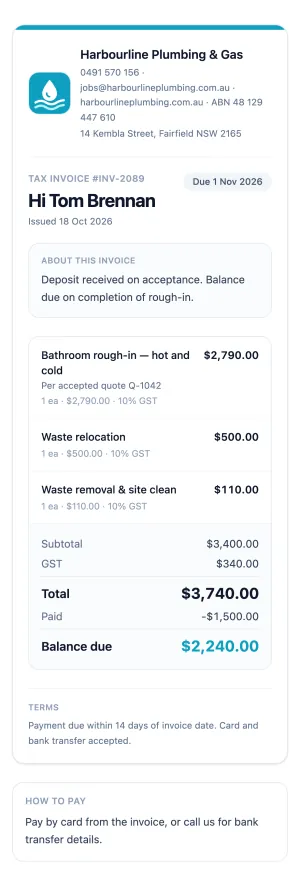
The accepted quote becomes the invoice, lines and all. Send it before you leave the site and get paid sooner.
Get paid
Get paid before you've packed up.
Your customer pays the invoice by card from their phone, and the money lands in your bank, usually within a couple of business days.
- They pay by cardFrom the invoice on their phone
- Secure card paymentStandard card fees apply
- Your bankUsually a couple of business days
Scan to pay
Paid on site, on their phone.
Every invoice you send has a Scan to pay code. Finish the job, show them your phone, and you're paid before you leave the driveway.
Who's paid
Know exactly who owes you.
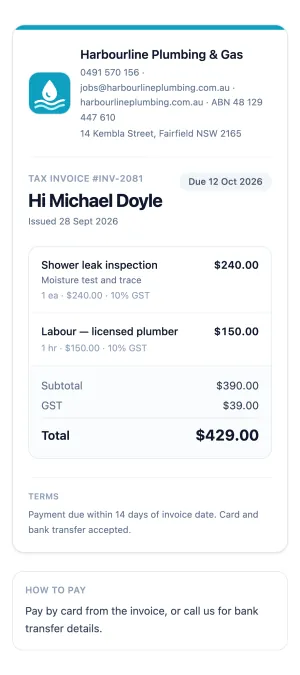
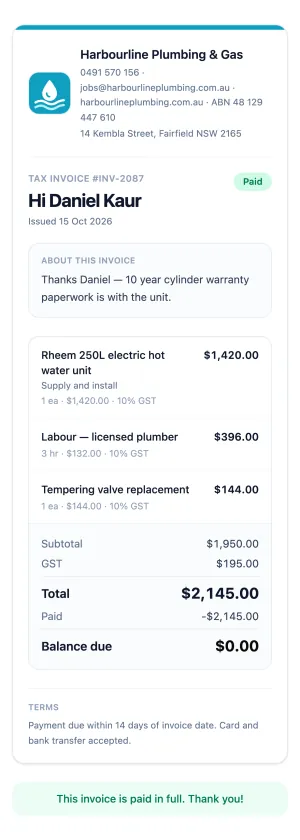
Set a due date of 7, 14 or 30 days and every invoice shows where it's at. Paid in cash or by transfer? Record it and the balance updates, so your books stay up to date.
Fair questions
What tradies ask first.
- Can I type instead of talking?
- Yes. Type the same thing into the box and it works the same way.
- Can I check it before it goes?
- Yes. It stays a draft until you press send, so you're always in control.
- Can I use my own terms?
- Yes. Set them once and they go on every quote.
- Does it put my ABN and GST on it?
- Yes. Your ABN goes on every quote and invoice, with GST set per line.
- How do customers pay?
- They tap Pay now on the invoice and pay by card, straight into your account, so you get paid faster.
- What does a card payment cost me?
- Just the standard card processing fee.
- How do I start taking card payments?
- Set it up once from Toolbox settings → Invoice & payments. It takes a few minutes with your ABN, ID and bank details. Your first payout takes a little longer while your account is checked.
- Your first month free
- One subscription covers every listing you have
- Quoting and invoicing included on jobs from Service.com.au leads
- Cancel any time from Billing, and your jobs and documents stay yours
Card taken at sign-up. You won't be charged until your free month ends.
The rest of Toolbox
Run every job from one list.
Every job in one list, from first call to paid, and Service.com.au leads whenever you want more work.